
Brooke Mathews August 14, 2025 Not all feedback is created equal and not all survey platforms are built to capture feedback right when it matters most in the moment face to face. Whether you’re running a retail store, university, clinic, airport, or bank branch, capturing in-person feedback is key to improving customer experience, identifying issues before they escalate, & building loyalty that actually lasts. We’ve rounded up 7 of the best customer survey companies focused on in-person feedback, including intuitive smiley emoji terminals, customer feedback kiosks & mobile-optimized experiences.
Let’s jump in!
In this article
What Changed in This Market in 2026
Before the list, some context that most comparison posts have not caught up with. 2026 reshaped this category more than any year since these tools existed, and a shortlist that ignores it will point you at products that are being retired.
- GetFeedback is now a SurveyMonkey product getfeedback.com redirects to SurveyMonkey, and GetFeedback Direct - the survey-distribution product relevant to in-person feedback - is being sunset on 31 December 2026. Treat GetFeedback and SurveyMonkey as one vendor, not two options.
- InMoment merged into Press Ganey Forsta Qualtrics then acquired the combined company for $6.75 billion, consolidating three enterprise names into one.
- Medallia changed ownership entirely Another enterprise incumbent under new control, with the roadmap questions that follow.
- Delighted shut down A fixture on best-of lists since 2018, it closed on 30 June 2026.
1. SurveyStance – Best for High Response Rates with Emoji-Based Feedback
Website: www.surveystance.com Why it Stands Out: SurveyStance was designed specifically for collecting feedback in the real world.
Using emoji-based terminals, SurveyStance makes it easy for customers to leave feedback in just a tap... no typing, no fuss. Whether it’s by the front desk, exit, checkout, or waiting area these smiley face buttons grab attention, collect sentiment in seconds, and deliver real-time insights back to your team.
Top Features: Feedback Terminals with customizable smiley faces Offline mode + secure cloud sync Real-time alerts for low scores Location & question specific reporting AI-powered text analysis for open feedback Perfect for: Retail, universities, clinics, government buildings, and anywhere people walk in & walk out.
User Reviews and Insights: Emerging among the best customer survey companies for emoji terminals, SurveyStance excels in quick capture.
G2 users praise its ease in high-traffic spots, like "iPad kiosks locked down for smiley-face surveys." With 0 reviews on Capterra (rating 0.0), it's building traction—early adopters love one-tap simplicity but want more integrations. Real users say it's great for startups; check G2 or Capterra.
2. Zonka Feedback – Best for Versatile Survey Channels
Website: www.zonkafeedback.com Why it Stands Out: Zonka offers a solid option for teams that want to combine in-person kiosks with digital feedback channels.
Their tablet-based kiosk surveys work great for capturing feedback on-site, while also supporting email & SMS surveys.
Top Features: Android kiosk support Real-time analytics dashboards Supports NPS, CSAT, CES formats Multilingual surveys for diverse locations Perfect for: Teams with physical locations and online interactions who want everything under one roof.
User Reviews and Insights: A top pick among best customer survey companies for multichannel use, Zonka scores 4.7/5 on Capterra (100+ reviews): "Easy, fun surveys with great forms." G2 gives 4.8/5, lauding analytics but noting overwhelm for in-person-only.
Users on forums favor it for hybrids, though entry plans could be cheaper; see G2 or Capterra.
3. SurveySparrow – Best for Conversational Kiosk Surveys
Website: www.surveysparrow.com Why it Stands Out: SurveySparrow brings a sleek, mobile-first design to in-person feedback.
Their offline survey mode is especially useful for on-site data collection even when your Wi-Fi is spotty. Plus, the conversational survey style feels less like a form and more like a chat.
Top Features: Offline kiosk mode Conversational UI Auto-sync when connected Built-in analytics with CSAT/NPS tracking Perfect for: Retail pop-ups, service counters, healthcare, and hospitality check-ins.
User Reviews and Insights: Standing out in best customer survey companies lists, SurveySparrow earns 4.4/5 on G2 (2,000+ reviews): "Conversational UI boosts engagement like chats." Capterra matches at 4.4/5, praising action-turning but flagging complexity for newbies.
Real users highlight offline mode for Wi-Fi issues, with plan-varying integrations; explore G2 or Capterra.
4. GetFeedback – Best for Integrations with Salesforce
Why it stands out: GetFeedback shines when you need a seamless connection between in-person experiences and your CRM, especially Salesforce. While known for email and web surveys, its mobile-optimized surveys can be run in kiosk mode too.
Top features:
- Kiosk-ready surveys
- Deep Salesforce integration
- NPS, CSAT and custom workflows
- Real-time feedback alerts
Perfect for: brands using Salesforce that want to close the loop on customer feedback fast - with the sunset date above factored into the decision.
User reviews and insights: among customer survey companies with CRM ties, GetFeedback gets 4.5/5 on Capterra (“Robust interface for stunning surveys”). G2 discussions tout the Salesforce integration, but users call it “overkill for small biz”. Forums praise fast loops, despite pricing gripes.
5. AskNicely – Best for Frontline Teams
Website: www.asknicely.com Why it Stands Out: AskNicely focuses on empowering frontline employees with real-time feedback and coaching.
It supports on-site feedback capture using tablets or shared devices, helping teams make fast improvements based on customer sentiment.
Top Features: Mobile-friendly, on-site surveys Employee scorecards tied to customer feedback Instant alerts for poor experiences Frontline team coaching tools Perfect for: Brands with customer-facing staff (retail, service, healthcare) who want to drive performance with feedback.
User Reviews and Insights: Cited often in best customer survey companies for coaching, AskNicely scores 4.7/5 on G2 (1,000+ reviews): "Measures experiences and motivates teams." Capterra at 4.6/5 values alerts, but notes costs for big teams.
Users say the app empowers staff, wanting more low-tier customization; check G2 or Capterra.
6. Hotjar (Surveys & Feedback) – Best for Observing In-Person + Digital Behaviors
Website: www.hotjar.com Why it Stands Out: Hotjar is typically used for digital behavior tracking, but their on-site feedback widgets & kiosk-ready surveys can be deployed in physical spaces via tablets or check-in stations.
You get both the “what happened” and the “why it happened.” Top Features: Visual feedback widgets for kiosk tablets Real-time responses with heatmaps (for web use) Simple survey builder with emojis, star ratings & open text Feedback tagging & trend tracking Perfect for: Teams looking to combine physical customer sentiment with digital behavior data.
7. SurveyMonkey Kiosk Mode – Best for Getting Started Quickly
Website: www.surveymonkey.com Why it Stands Out: Already using SurveyMonkey?
You can repurpose their surveys in kiosk mode on any tablet to capture quick on-site feedback. It’s a simple, no-frills solution for events, pop-ups, or testing out in-person feedback collection. It requires a bit more setup and babysitting, but will do the trick.
Top Features: Easy to set up kiosk surveys Templates for CSAT, NPS & more Response summaries & exports Works on most mobile devices Perfect for: Teams dipping their toes into in-person surveys without switching platforms.
Choosing The Right In-Person Survey Platform
Not all survey tools are built for face-to-face feedback. Here's what to look for:
- Speed Can a customer leave feedback in under 5 seconds?
- Offline functionality Does it still work if the Wi-Fi drops?
- Simplicity Does it invite participation, not overwhelm it?
- Instant alerts Will your team know if something goes wrong?
- Actionable data Can your team actually use the feedback tomorrow?
If you're looking for a tool that's built specifically to make in-person feedback frictionless, fast and actionable, SurveyStance is a no-brainer.
Final Thoughts
In-person feedback is real, raw & incredibly valuable but only if you have the right tools to capture it. Whether you go with emoji buttons, touchscreen kiosks, or tablet-based surveys, the goal is the same: make it dead simple for people to tell you how they feel and make it super easy for your team to act on it. Need help picking the best setup? 👉 Talk to our team at SurveyStance —we’re happy to help.
Survey Company Comparison Chart
When comparing the best customer survey companies for in-person feedback, a quick side-by-side look can really help clarify the options. Pricing is shown as a model rather than a figure - published rates move often enough that any number here would be wrong within months, so check the vendor's own pricing page for current rates and expect the quote-only vendors to want a call.
| Company | Pricing model | Ease of use | Integration options | Response rates | Unique strengths |
|---|---|---|---|---|---|
| SurveyStance | Published monthly pricing per kiosk or per OneClick survey. Month-to-month, no contract, free trial. | Very easy to use. Tap-based emoji interface requires no typing, making it quick for busy spots. | Open REST API, plus popular integrations via Zapier (3,000+) and similar platforms. Webhook integrations available. | Highest reported, via emoji terminals — quick taps boost participation. | Emoji-based terminals for high engagement, specialized for in-person only. |
| Zonka Feedback | Published tiers from entry level to growth, with a free plan. | High — user-friendly dashboard and multilingual support for diverse teams. | Android support, NPS/CSAT formats; integrates with email and SMS tools. | Not specified; strong in multi-channel setups. | Versatile at combining in-person and digital; great for hybrid teams, but may overwhelm pure in-person users. |
| SurveySparrow | Published entry tier billed annually; higher tiers by quote. Free plan with limits. | High — conversational UI feels like a chat, reducing form fatigue. | Slack, HubSpot, Zendesk (up to 25+ in Enterprise); API and webhooks. | Not specified; offline mode helps in spotty Wi-Fi areas. | Offline kiosk mode and auto-sync; excels in pop-ups and hospitality, with sentiment analysis as a bonus. Advanced features may add complexity. |
| GetFeedback | Quote only, no public tiers. Confirm which product line the quote covers. | High — launch surveys in minutes with templates. | Deep Salesforce integration; pushes to CRMs automatically. | Not specified; real-time alerts aid quick responses. | Mobile-optimized for kiosk use; fuses feedback with CRM data for fast loops, ideal for Salesforce users — but pricing opacity is a drawback. |
| AskNicely | Published tiers billed annually, positioned at the upper end of this list. | Medium-high — AI dynamic surveys streamline setup, but frontline tools add a learning curve. | 200+ including Slack and Microsoft Teams; API extracts. | Average 15% (market-leading per site). | QR code and on-site surveys with employee coaching; empowers staff, though the higher cost suits larger teams. |
| Hotjar (Surveys & Feedback) | Free tier plus published paid plans. | High — AI-powered survey builder creates in seconds. | HubSpot, Google Analytics, Slack, Zapier (3,000+); webhooks and API in higher tiers. | Not specified; unlimited in the Scale plan. | Mainly used for tracking user experience with visual heatmaps; has built-in user experience surveys. |
| SurveyMonkey (Kiosk Mode) | Published per-user tiers; enterprise by quote. | High — easy kiosk setup on tablets with templates. | Office 365, Slack, Google Drive; Salesforce and Tableau in Enterprise. | Not specified. | Quick-start kiosk mode for events; AI analysis adds value, though it requires more setup for in-person. |
Based on user reviews, emoji interfaces like SurveyStance's often see 2–3× higher engagement in high-traffic areas, from forums like G2. Zonka's multi-channel approach gets praise for flexibility, but some users note it's better for mixed online/offline than pure in-person. GetFeedback's Salesforce tie-in is a game-changer for CRM-heavy teams, per Capterra reviews, though smaller businesses might find it overkill. SurveyMonkey is great for beginners dipping into kiosks, but advanced users sometimes complain about response limits in lower plans.
Written by Brooke Matthews, a customer experience expert with 10+ years in retail feedback tools. While I work with SurveyStance, this review is based on independent research to help you choose the best fit.
FEEDBACK PROGRAMS
Turn this research into a live feedback program.
Compare kiosk, QR code, email signature, and OneClick feedback options built for faster response and real-time visibility.

Discover how Feedback Kiosks empower customer choice with in person feedback kiosks to boost response rates using a voluntary approach to collecting feedback.
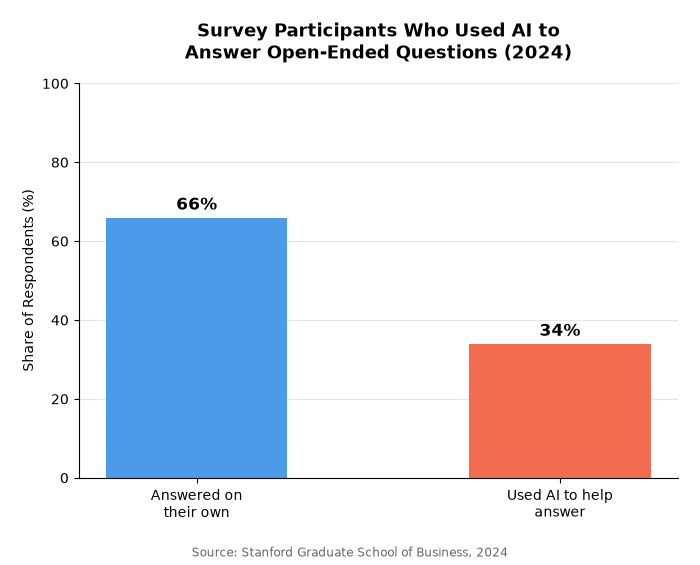
AI-generated survey responses are quietly reshaping research data. See what Stanford and NORC found, the signs an answer wasn't written by a person, and how to protect your own feedback data.
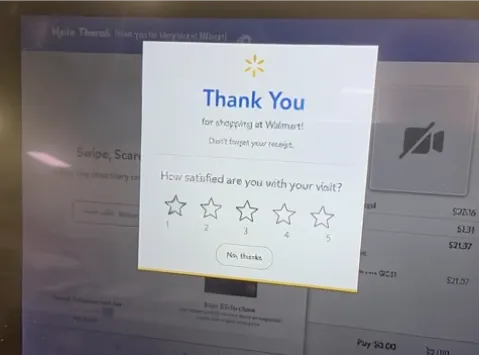
Must see top 5 top in-person feedback tools for 2026, from emoji kiosks to QR codes. Boost customer insights with SurveyStance's complete guide.